Everything flows together.
Invoices, expenses and receipts for freelancers and contractors
See which invoices need a follow-up and keep your receipts ready for tax time. Send estimates and invoices, track payments, and get reminders, all in one place. If you're just organizing your own records, the Personal plan is for you.
Free during beta. No credit card required.
Available in Canada, the UAE and the United States. See FlowSawa for the UAE · See FlowSawa for the US
One app for one person or a whole company
Pick the one that sounds like you.
I send invoices
Invoices with GST/HST or UAE VAT, expenses, receipts and follow-ups, for one person.
Freelance plan: free during betaJust keeping my receipts
Organize receipts, medical expenses, donations and other tax records in one place, without running a business.
Personal plan: free during betaI also keep stock
Everything in Freelance, plus products, stock counts and low-stock warnings.
Solo plan: coming soonI have a team
Track purchasing, stock and deliveries across multiple warehouses, plus commissions, staff leave and pay records, and staff roles.
Business plan: coming soonMade for freelancers and contractors first
If you work for yourself, FlowSawa takes the paperwork off your plate. Send an invoice in a minute, snap each receipt as you go, and see the GST/HST you collected and paid. At tax time, your records are ready to hand to your accountant.
For consultants, tradespeople, designers, drivers and anyone who invoices clients.
Expenses and receipts
Add each expense with a photo or PDF of the receipt. Pick your province and the common expense categories come ready, each with its tax line code. Change, add or remove any of them.
Invoices
Send clean invoices. FlowSawa adds your GST/HST registration number and works out the applicable tax on your invoices. See what is paid and what is late.
Money overview
See your income, your expenses and what clients still owe you, in plain English.
Follow-ups
Payment reminders for late invoices, which wait for you to check them, and a monthly reminder for the bills you pay every month.
See it in the app
Real FlowSawa screens, with sample data. Tap a picture to see it full size.
Freelance
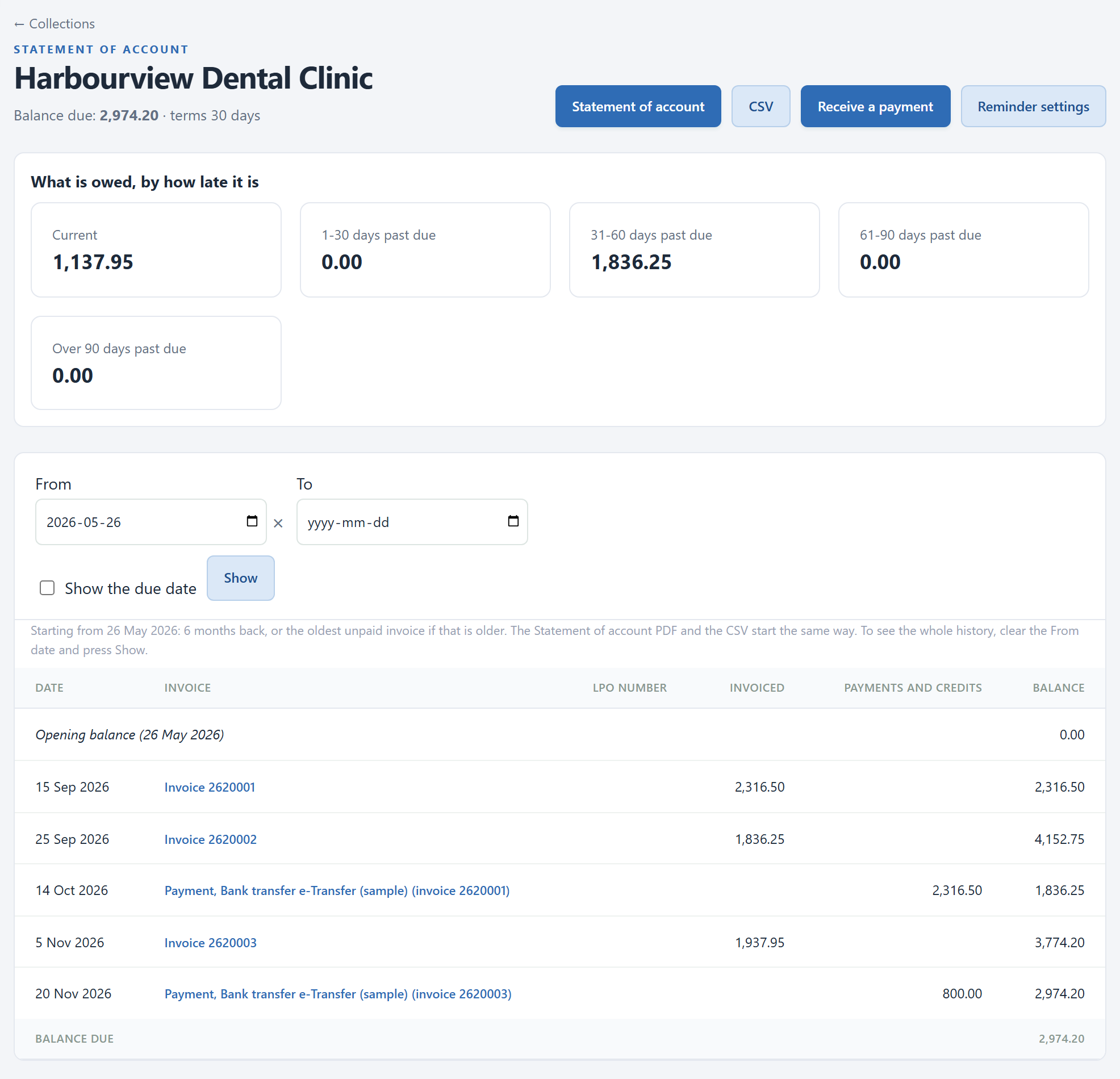
See what each client owes
One statement per client, across all their invoices, with what is current and what is late. Payment reminders wait for you to check them before anything is sent.
Personal
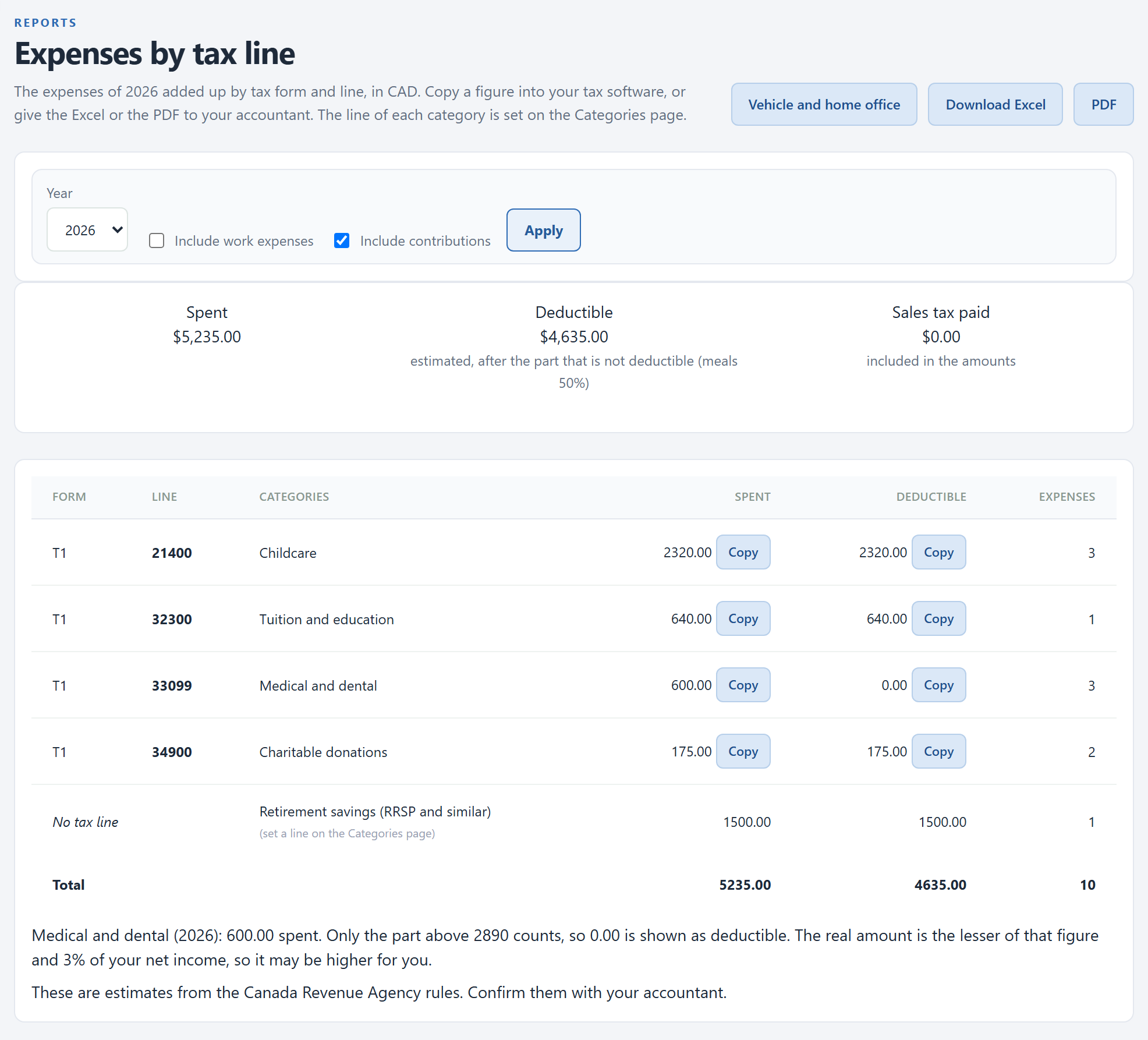
Get a year’s records ready for tax time
Medical, donations, childcare and tuition, added up by tax line for the year. Copy a figure into your tax software, or download Excel or PDF for your accountant.
Already tracking expenses in a spreadsheet? Import an Excel or CSV file, preview the result and see which rows need attention before anything is saved. How import works
Made for Canada
Built around Canadian rules, not adapted later
- GST, HST and provincial rates set up for you
- Canadian dollars and Canadian spelling
- Expense categories that follow the CRA's business income form
- Your app data is stored in Canada
GST/HST ready
Track the GST/HST you collect on sales and pay on expenses, so you know what to set aside and what to claim back.
Works on your phone
FlowSawa runs in your browser, so there is nothing to download from an app store. Add it to your phone’s home screen and it opens like an app, with notifications. Snap a receipt between jobs, and it’s on your laptop too.
AI receipt scanning
Upload a receipt and FlowSawa suggests the details for you to review.
Polish with AI
Say it better in one tap. Polish your notes, emails and descriptions: spelling, tone and clarity, in English, French or Arabic.
Free beta
Try FlowSawa free during beta
No credit card required.
Free guides for Canadian freelancers
How to track business expenses
What to keep, for how long, and a weekly routine that takes ten minutes.
Read the guideGST/HST for freelancers
When you must register, which rate to charge, and how to claim tax back.
Read the guideHow to write an invoice in Canada
What an invoice must show, with GST/HST, so you get paid faster.
Read the guideWho's behind FlowSawa
- FlowSawa is built and run in Canada.
- Questions or problems? Write to [email protected]. A real person reads it and writes back.
- Your app data is stored in Canada.
- You can export everything at any time: your tables as CSV, or all your data and files as a zip.
Questions
Who is FlowSawa for?
Freelancers, contractors and self-employed people in Canada, the UAE and the United States who want one simple place for invoices, expenses and receipts. If you're just keeping your own records, the Personal plan is for you.
Is the beta open?
The free beta is open in Canada, the UAE and the United States. Personal and Freelance are free during beta. No credit card required.
What happens after the beta?
Planned pricing after beta: Freelance CA$10/month and Personal CA$4/month, in Canadian dollars. We will let you know before the beta ends, and you decide whether to subscribe.
Can I export my records?
Yes. You can export your records at any time. One button exports all your tables as CSV. Another downloads all your data and files as a zip.
Is there a FlowSawa app?
FlowSawa is a web app (sometimes called a PWA), not an App Store or Google Play app. Sign in at app.flowsawa.com, then add it to your phone's home screen: on iPhone, tap Share, then Add to Home Screen; on Android, tap Install app. It then opens in its own window like an app and can send you notifications.
Where is my data stored?
Your app data is stored in Canada.